Video to study notes

Turn video into study notes without rebuilding everything by hand

Upload lecture videos, class recordings, tutorials or study material. Heyblocks turns them into structured notes, flashcards, summaries and reusable study outputs built around your workflow.

Start free See how it works

10 free credits included. No credit card required.

Immediate value

Before vs after on a real study-video workflow

Process flow: Blueprint setup -> Video upload -> Transcript extraction -> Study-ready notes

1. Apply Blueprint Study Guide / Flashcards / Questions
2. Upload Source video1.mp4 + video2.mp4
3. Transcript + Generate Timestamped source text to tabs
4. Edit + Export Final notes ready to use

Before: raw source transcripts

2 SOURCES
video1.mp4 Audio · 147 words

[00:00:00] This app turns your voice into structured notes automatically.

[00:00:04] You record a meeting, a lecture, a thought, or upload an audio file.

[00:00:09] The app transcribes it and then uses AI to break it down into useful tabs.

[00:00:14] A summary, action items, key decisions.

[00:00:18] Whatever structure makes sense for what you recorded.

[00:00:21] You can set up blueprints to define exactly which tabs get generated every time.

[00:00:26] A meeting blueprint might give you an agenda recap, open questions, and next steps.

[00:00:31] A lecture blueprint might give you a concept overview and a study guide.

[00:00:35] Everything stays organized in your workspace.

[00:00:38] You can rename tabs, color code them, add emoji so your notes look the way you think.

[00:00:44] No more staring at a wall of transcript text trying to find what mattered.

[00:00:48] Heyblocks does that part for you.
video2.mp4 Audio · 144 words

[00:00:00] Heyblocks turns your voice into structured notes automatically.

[00:00:04] You record a meeting, a lecture, a thought, or upload an audio file.

[00:00:08] Heyblocks transcribes it and then uses AI to break it down into useful tabs, a summary, action items, key decisions.

[00:00:17] Whatever structure makes sense for what you recorded.

[00:00:20] You can set up blueprints to define exactly which tabs get generated every time.

[00:00:24] A meeting blueprint might give you an agenda recap, open questions, and next steps.

[00:00:30] A lecture blueprint might give you a concept overview and a study guide.

[00:00:35] Everything stays organized in your workspace.

[00:00:38] You can rename tabs, color code them, add emoji so your notes look the way you think.

[00:00:44] No more staring at a wall of transcript text trying to find what mattered.

[00:00:48] Heyblocks does that part for you.
After: tabbed output (click tabs, edit text)

Voice-to-Structured Notes App Click text below to edit

Study Guide


Voice-to-Structured Notes App

TL;DR

Heyblocks is an AI-powered app that converts spoken audio (meetings, lectures, thoughts, or uploaded files) into organized, tabbed notes. It automatically transcribes, summarizes, extracts action items, key decisions, and can apply custom blueprints to generate the exact set of tabs you need (for example, agenda recap and study guide). Tabs are fully customizable with names, colors, and emojis, keeping your workspace tidy and searchable.


Key Concepts
  • Automatic Transcription
    • Records or uploads audio - AI generates a text transcript.
  • AI-Driven Structuring
    • Breaks the transcript into useful tabs:
    • Summary
    • Action items
    • Key decisions
    • Custom sections defined by blueprints
  • Blueprints
    • Pre-set templates that dictate which tabs appear for a given content type.
    • Meeting Blueprint - agenda recap, open questions, next steps.
    • Lecture Blueprint - concept overview, study guide.
    • Users can create additional blueprints for other scenarios (brainstorms, interviews, etc.).
  • Tab Customization
    • Rename tabs.
    • Assign colors for visual grouping.
    • Add emojis for quick identification.
  • Workspace Organization
    • All generated tabs live in a single, searchable workspace.
    • Eliminates the need to manually skim raw transcripts.

How It Works - Step-by-Step Flow
  1. Capture Audio
    • Record directly in the app or upload an existing audio file.
  2. Transcription
    • Heyblocks AI converts the audio to text in seconds.
  3. Apply Blueprint
    • Select the appropriate blueprint (meeting, lecture, etc.).
    • The blueprint determines which tabs are created.
  4. Review and Edit
    • Browse generated tabs.
    • Rename, recolor, or add emojis as needed.
  5. Export / Share
    • Export individual tabs or the whole workspace to common formats (PDF, Markdown, etc.).
    • Share with teammates or classmates.

Action Items for New Users
  • Sign Up and Explore
    • Create an account and navigate to the Blueprints section.
  • Set Up Your First Blueprint
    • Choose Meeting or Lecture as a starter.
    • Customize tab names, colors, and emojis to match your workflow.
  • Test the Workflow
    1. Record a 5-minute mock meeting.
    2. Let Heyblocks generate the tabs.
    3. Adjust any tab titles or colors.
  • Integrate With Existing Tools
    • Link Heyblocks to your project management or note-taking platform (for example, Notion or Trello) if supported.
  • Iterate
    • After a few uses, refine blueprints: add or remove tabs, rename sections, tweak colors.

Study Guide Example (Lecture Blueprint)
Tab Purpose Typical Content
Concept Overview High-level summary of the lecture main ideas Bullet-point list of core concepts, definitions, and relationships
Key Terms Vocabulary that students must know Glossary with brief definitions
Study Guide Structured revision material Section headings aligned with lecture slides, sample questions, recommended further reading
Action Items Follow-up tasks for the student Review chapter 4, complete problem set #5

Customize colors (for example, blue for Concept Overview, green for Key Terms) and add emojis for quick visual cues.


Tips and Best Practices
  • Keep Blueprints Lean - Start with 2-3 tabs; add more only when needed.
  • Use Consistent Color Coding - Same color for similar content across projects improves visual scanning.
  • Leverage Emojis Sparingly - One emoji per tab is enough to convey purpose without clutter.
  • Regularly Review Generated Tabs - Ensure AI accuracy; correct mis-transcriptions promptly to keep notes reliable.
  • Export Frequently - Save a copy after each major session to avoid data loss.

Potential Use Cases
  • Team Meetings - Capture decisions, assign next steps, and archive agenda recaps.
  • University Lectures - Produce study guides that align with syllabus sections.
  • Podcasts and Interviews - Extract quotes, key takeaways, and action points for content creators.
  • Personal Thought Dumps - Turn brainstorming recordings into organized project outlines.

Flashcards


Voice-to-Structured Notes App

Flashcards - Heyblocks Voice-to-Notes App

  • Q: What is the primary function of Heyblocks?
    A: It automatically converts spoken audio (recordings or uploads) into structured notes.
  • Q: Which types of audio can you use with Heyblocks?
    A: Meetings, lectures, personal thoughts, or any uploaded audio file.
  • Q: How does Heyblocks process the audio?
    A: First it transcribes the audio, then AI categorizes the text into useful tabs such as summaries, action items, and key decisions.
  • Q: What are blueprints in Heyblocks?
    A: Pre-defined templates that specify which tabs should be generated for a particular kind of recording.
  • Q: Give two examples of blueprints and the tabs they produce.
    A:
    1. Meeting blueprint - agenda recap, open questions, next steps.
    2. Lecture blueprint - concept overview, study guide.
  • Q: How can you personalize the generated tabs?
    A: Rename tabs, assign colors, and add emojis to match your preferred visual style.
  • Q: What problem does Heyblocks solve for users?
    A: It eliminates the need to manually sift through long transcripts to locate important information.
  • Q: Where are all the generated notes stored?
    A: Within the user organized workspace in Heyblocks.
  • Q: Can Heyblocks handle multiple recordings in one session?
    A: Yes; each recording can be processed individually, with its own set of tabs based on the selected blueprint.
  • Q: What is the benefit of using the action items tab?
    A: It highlights tasks that need to be completed, making follow-up easier after meetings or lectures.

Practice Questions


Voice-to-Structured Notes App

Practice Questions - Heyblocks Voice-to-Notes App

  1. What is the primary function of the Heyblocks app?

    • A) Record video conferences
    • B) Convert spoken audio into structured notes automatically
    • C) Translate documents into multiple languages
    • D) Generate visual mind maps from text

    Answer: B

  2. Which types of content can you input into Heyblocks? (Select all that apply)

    • A) Live meeting recordings
    • B) Lecture audio files
    • C) Personal thoughts captured via voice memo
    • D) Uploaded audio files

    Answers: A, B, C, D

  3. After transcription, how does Heyblocks organize the information?

    • A) It creates a single continuous transcript only
    • B) It splits the content into customizable tabs such as summary, action items, and key decisions
    • C) It formats the text into a PDF report with no further categorization
    • D) It sends the raw audio to a human editor for manual summarization

    Answer: B

  4. What is a blueprint in the context of Heyblocks?

    • A) A visual diagram of the meeting agenda
    • B) A preset configuration that determines which tabs are generated for a given recording type
    • C) A security protocol for encrypting audio files
    • D) A tutorial video on how to use the app

    Answer: B

  5. Match each blueprint type with the typical tabs it would generate.

    Blueprint Type Expected Tabs
    Meeting -
    Lecture -

    Answers:

    • Meeting blueprint: agenda recap, open questions, next steps
    • Lecture blueprint: concept overview, study guide
  6. Which of the following customization options are available for tabs in Heyblocks? (Select all that apply)

    • A) Renaming tabs
    • B) Color-coding tabs
    • C) Adding emojis to tabs
    • D) Changing the audio playback speed

    Answers: A, B, C

  7. What problem does Heyblocks aim to solve for users?

    • A) The difficulty of scheduling meetings across time zones
    • B) The need to manually sift through long transcripts to find key information
    • C) The lack of transcription services for non-English languages
    • D) The high cost of hiring professional note-takers

    Answer: B

  8. True or False: Heyblocks can only process live recordings and cannot handle pre-recorded audio files.

    Answer: False

  9. In which part of the workflow does AI play a role?

    • A) Recording the audio
    • B) Transcribing the spoken words into text
    • C) Breaking the transcript into useful tabs and generating summaries, action items, etc.
    • D) Exporting the final notes to a cloud storage service

    Answer: C

  10. Suppose you are a student who wants a concise study aid from a recorded lecture. Which blueprint would you select, and what tab(s) would you expect to receive?

    Answer: Choose the lecture blueprint, which would generate a concept overview and a study guide.

MP4

Video uploads supported

Tabs

Structured outputs, not one summary

Anki

Flashcard export built in

Product Proof

See it in action

Upload sources on one screen, get structured tabbed notes on the next, and export to the format you need.

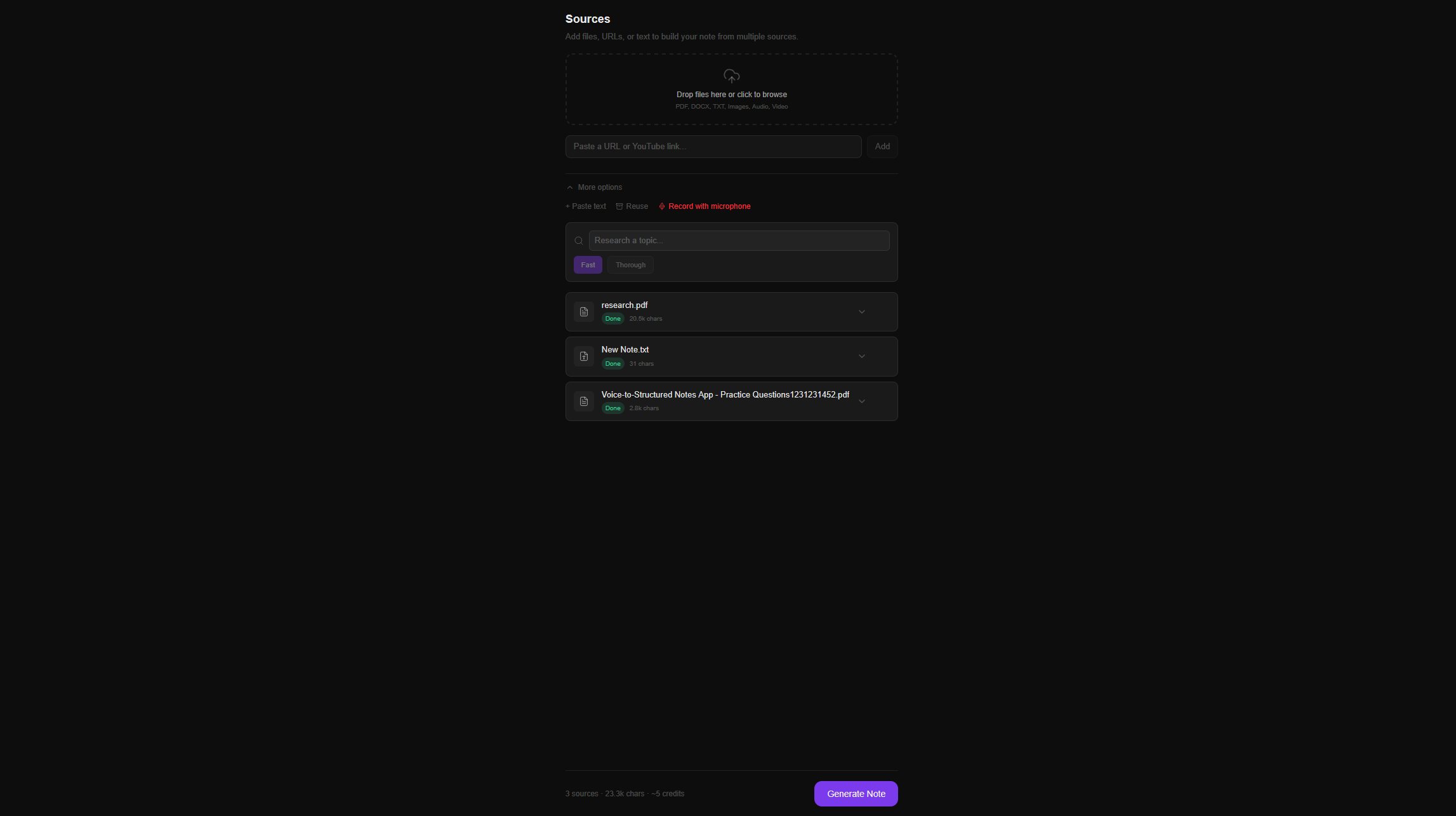
Heyblocks upload interface showing multi-source input and generate note button
1. Upload Add files, links, or text and hit generate.
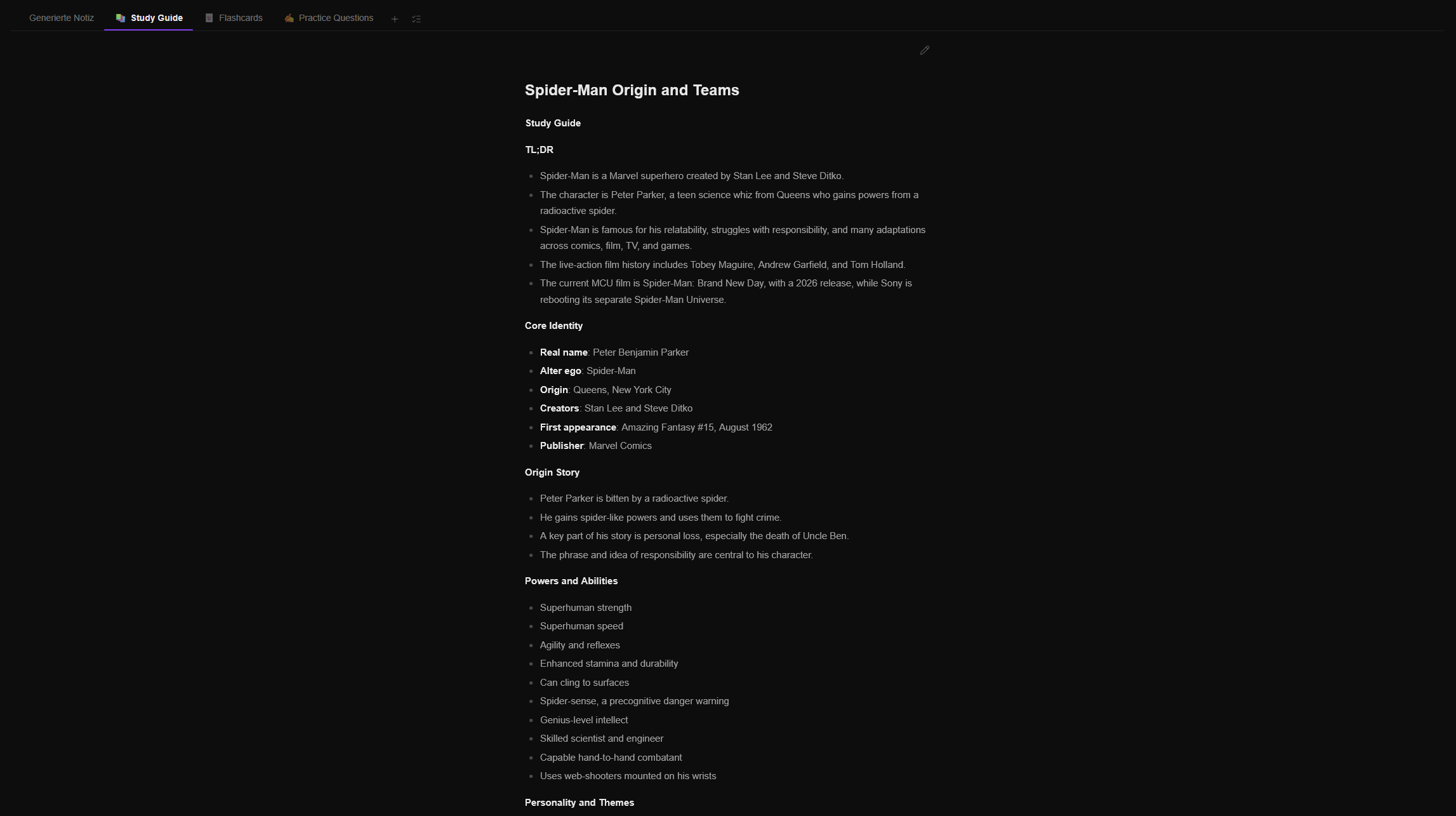
Heyblocks generated notes view with Study Guide, Flashcards, and Practice Questions tabs
2. Generated output Structured tabs ready for review and editing.
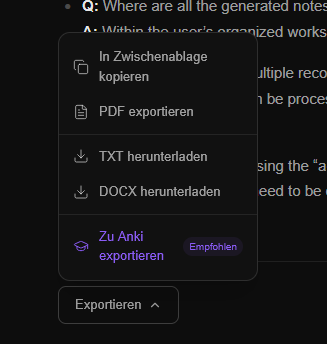
Heyblocks export menu showing PDF, TXT, DOCX and Anki export options
3. Export PDF, TXT, DOCX, and Anki (.apkg) from any tab.

Why people look for this

Watching a video is easy. Turning it into something you can study from is the hard part.

You lose time replaying sections

Instead of scrubbing through the same lecture again and again, get the key ideas in a structured format you can actually revise from.

Generic summaries are not enough

Study notes need sections, hierarchy, and useful output types like flashcards, key points, likely questions, and concept breakdowns.

Different videos need different outputs

A biology lecture, a case law review, and a math tutorial should not all become the same kind of notes.

You need something you can keep using

The best study notes are the ones you can export, edit, and turn into your own workflow instead of leaving them trapped in one tool.

How it works

How to turn video into study notes with Heyblocks

STEP 01

Upload your video

Add your lecture recording, class replay, tutorial, or study video. Heyblocks supports common video and audio formats, including MP4.

STEP 02

Choose the output you need

Use a Blueprint to decide whether the video becomes summary notes, flashcards, key concepts, exam prep tabs, or another study structure.

STEP 03

Edit and export

Refine the generated notes, regenerate individual tabs if needed, and export to PDF, Word, text, or Anki when you are ready to study.

Why Heyblocks fits

More than a transcript. More useful than a one-shot summary.

A lot of tools stop after transcription or give you one generic answer. Heyblocks is better when you need the video to become a repeatable study asset.

That is why the core idea is Blueprints: reusable output structures you can apply again and again. The same lecture video can become a study guide, a flashcard deck, a concept map in tab form, or a cleaner set of revision notes.

Best for videos like:

  • Recorded lectures and missed classes
  • Tutorial videos you want to revise from later
  • Seminar recordings with exam-relevant explanations
  • Study sessions, review videos, and class presentations

FAQ

Questions about turning video into study notes

Yes. The useful part is not just transcription, but turning the video into a structure you can actually study from. Heyblocks does that by converting the source into organized tabs such as summaries, key concepts, flashcards, and study guides.

Lecture recordings, class replays, tutorial videos, presentations, and other spoken study content work well. If the video contains useful explanations or teaching, it can usually become structured notes.

Yes. You can use a Blueprint that includes a flashcard tab, then export that output as Anki .apkg if you want to move directly into spaced repetition.

A transcript tool gives you the raw text. Heyblocks helps you turn that source into a usable study output with structure, editable sections, reusable templates, and exports.

Related workflows

Looking for a different source-to-output workflow?

Heyblocks also works for lecture recordings, interview transcripts, research sources, and meeting recordings when you need structured notes instead of a generic summary.

See the main product page See the meeting notes page See the research notes page See the interview summary page See the lecture recording page

Turn your next study video into notes you can actually use

Upload a video, choose the output format you want, and let Heyblocks build the first draft for you.

Start for free